
Card suppliers and minimum per warehouse
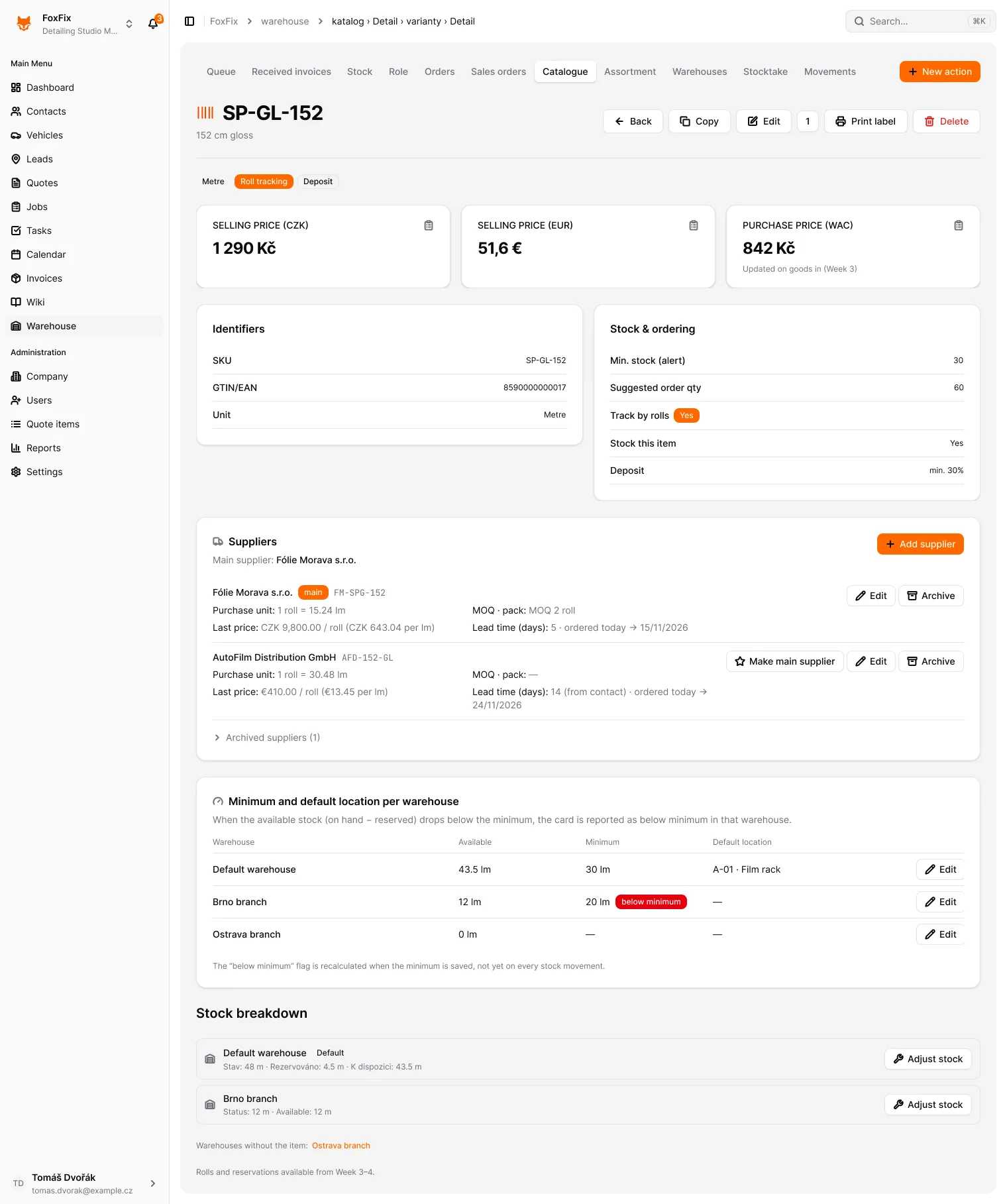
The stock card (variant) detail has two blocks:
- Suppliers – who you buy the card from: one main supplier and any number of alternative ones, each with its own code, purchase unit, MOQ, pack, last price and lead time.
- Minimum and default location per warehouse – the stock minimum and default location (zone) of the card for each warehouse separately. Two warehouses can therefore have a different minimum.
Open the card detail in Warehouse → Catalogue by clicking a product and then a variant (or by clicking an item in Stock). The blocks are part of the November 2026 update and appear once your company has it switched on.
 (opens the full-size image in a new tab)
Who can see it
- Anyone who may open the stock card sees the blocks. The supplier's last price is shown only to roles that see purchase prices. Someone who cannot see prices leaves the price unchanged when editing a supplier.
- Suppliers are added, edited and archived by Purchasing, Branch manager, CFO, Managing director and Admin – anyone with the right to edit in the “Stock cards” row of Settings → Roles and permissions.
- The same roles change the minimum and default location. A Branch manager only in the warehouses of their branch; a warehouse without a branch only roles with the right for the whole company.
- Other roles only read the blocks and do not see the buttons.
Card suppliers
The block header shows the name of the main supplier. Below it there is one row per supplier:
| Field | Meaning |
|---|---|
| Supplier | A contact in the Supplier category. The main one has the main label. |
| Supplier code | What the supplier calls the item (their SKU). |
| Purchase unit | What the supplier sells and how many stock units that is, e.g. 1 roll = 15.24 lm. |
| MOQ · pack | Minimum order and the multiples it is ordered in (both in purchase units). |
| Last price | Price per purchase unit excluding VAT in CZK or EUR. When the purchase unit differs from the stock unit, the price per stock unit is shown in brackets (€4,200 / roll (€275.59 per lm)). |
| Lead time (days) | Lead time in calendar days and the date goods ordered today would arrive. When the row has none, the supplier lead time from the contact is used (from contact). |
Add or edit a supplier
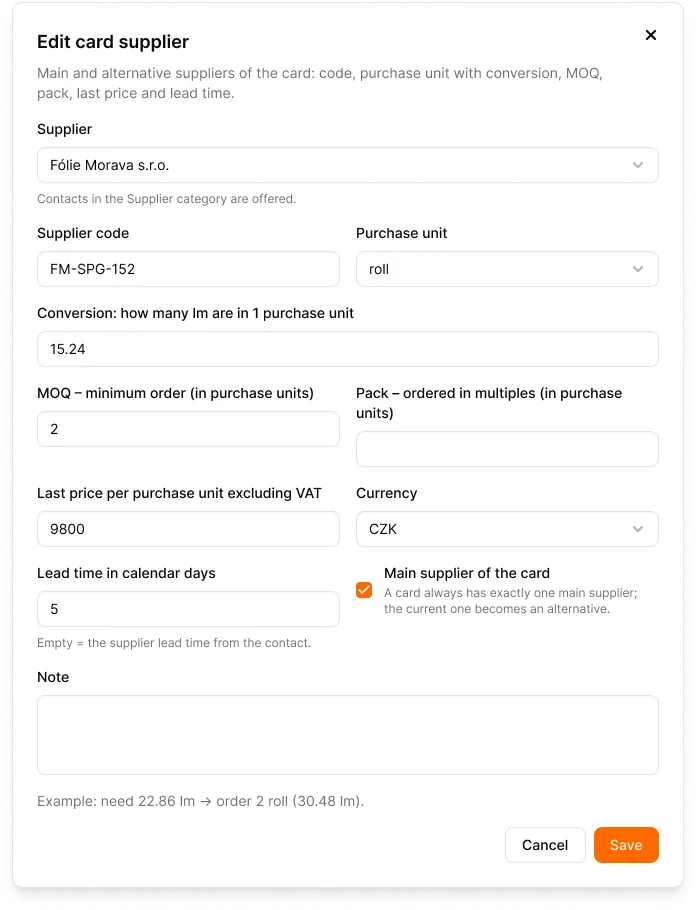
- In the Suppliers block click Add supplier (or Edit on an existing row).
- Choose the Supplier from contacts. Contacts in the Supplier category are offered; create a new supplier in Contacts first.
- Fill in what you know:
- Supplier code,
- Purchase unit – Same as card, or another unit from the list (Units),
- Conversion – how many stock units are in one purchase unit (roll = 15.24 lm, pack = 10 pcs). Not needed for units with a fixed conversion (litre → millilitres). A different unit cannot be saved without a conversion – FoxFix never assumes 1 : 1,
- MOQ and Pack,
- Last price and Currency,
- Lead time in calendar days,
- Note.
- Tick Main supplier of the card if it is the main supplier.
- Below the form there is an example of what would be ordered (e.g. need 22.86 lm → order 2 roll (30.48 lm)). Click Save.
 (opens the full-size image in a new tab)
A supplier can be on a card only once. The purchase price and lead time are not approval data – anyone who may edit the card changes them directly.
Main supplier
A card with suppliers always has exactly one main supplier:
- the first supplier of a card becomes the main one automatically,
- Make main supplier on another row (or the tick box in the form) turns the current main supplier into an alternative one,
- when you archive the main supplier or untick it, the oldest other active supplier becomes the main one.
Archiving
Archive removes the supplier from the card, but nothing is deleted. Archived suppliers are under the expandable Archived suppliers row, and Restore brings them back.
How the order is calculated
The quantity needed in the stock unit is converted to purchase units and rounded always up:
- to whole purchase units, or to a multiple of the pack when filled in,
- then to at least the MOQ (also rounded to the pack).
| Need | Supplier terms | Ordered |
|---|---|---|
| 25 pcs | pack = 10 pcs | 3 packs (30 pcs) |
| 30 lm | roll = 15.24 lm | 2 rolls (30.48 lm) |
| 20 lm | roll = 15.24 lm, MOQ 3 rolls | 3 rolls (45.72 lm) |
| 7 pcs | in multiples of 6 pcs (carton) | 12 pcs |
| 2,500 ml | bought in litres | 3 l (3,000 ml) |
The new supplier order (in preparation) uses this calculation.
Minimum and default location per warehouse
The block has one row per company warehouse:
- Available – on hand minus reserved,
- Minimum – the minimum of the card in this warehouse; the below minimum label appears when the available stock is less than the minimum,
- Default location – the location or zone where the card is normally stored in this warehouse.
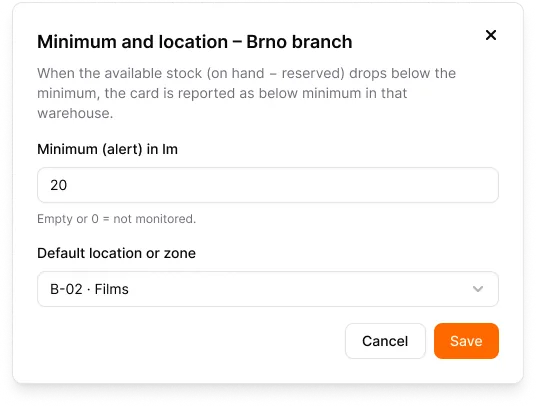
Set the minimum and location
- Click Edit next to the warehouse.
- Enter the Minimum in the stock unit of the card. Empty or 0 = not monitored.
- Choose the Default location or zone from the warehouse location tree (or No default location).
- Click Save.
 (opens the full-size image in a new tab)
You can also set a warehouse where the card has no stock yet – the minimum applies from the first receipt.
The “below minimum” flag only on save for now
The below minimum label is recalculated when you save the minimum, not yet on every receipt or issue. After stock movements it can therefore be out of date for a while. Automatic monitoring on every movement and order proposals from minimums come with the next step of the update.
The existing Min. stock (alert) field in the variant form stays and drives the Low stock status in the Catalogue list until the lists switch to the minimum per warehouse.