
Limits and rules
The Limits and rules page keeps in one place the numbers FoxFix uses to decide things in your company: up to what amount a purchase order needs no approval, when a reminder is sent, which discounts are offered or what a document number looks like. FoxFix supplies the defaults as recommendations. Your company overwrites them to match its own rules.
Who can see it
- Managing director, CFO and Admin – change the values.
- Other roles – see the page but cannot change anything.
Permissions follow the roles in Settings → Roles and permissions (the row “Settings (general)”, the right to configure for the whole company).
Open the page in Settings → Limits and rules. It is part of the November 2026 update and appears once your company has it switched on.
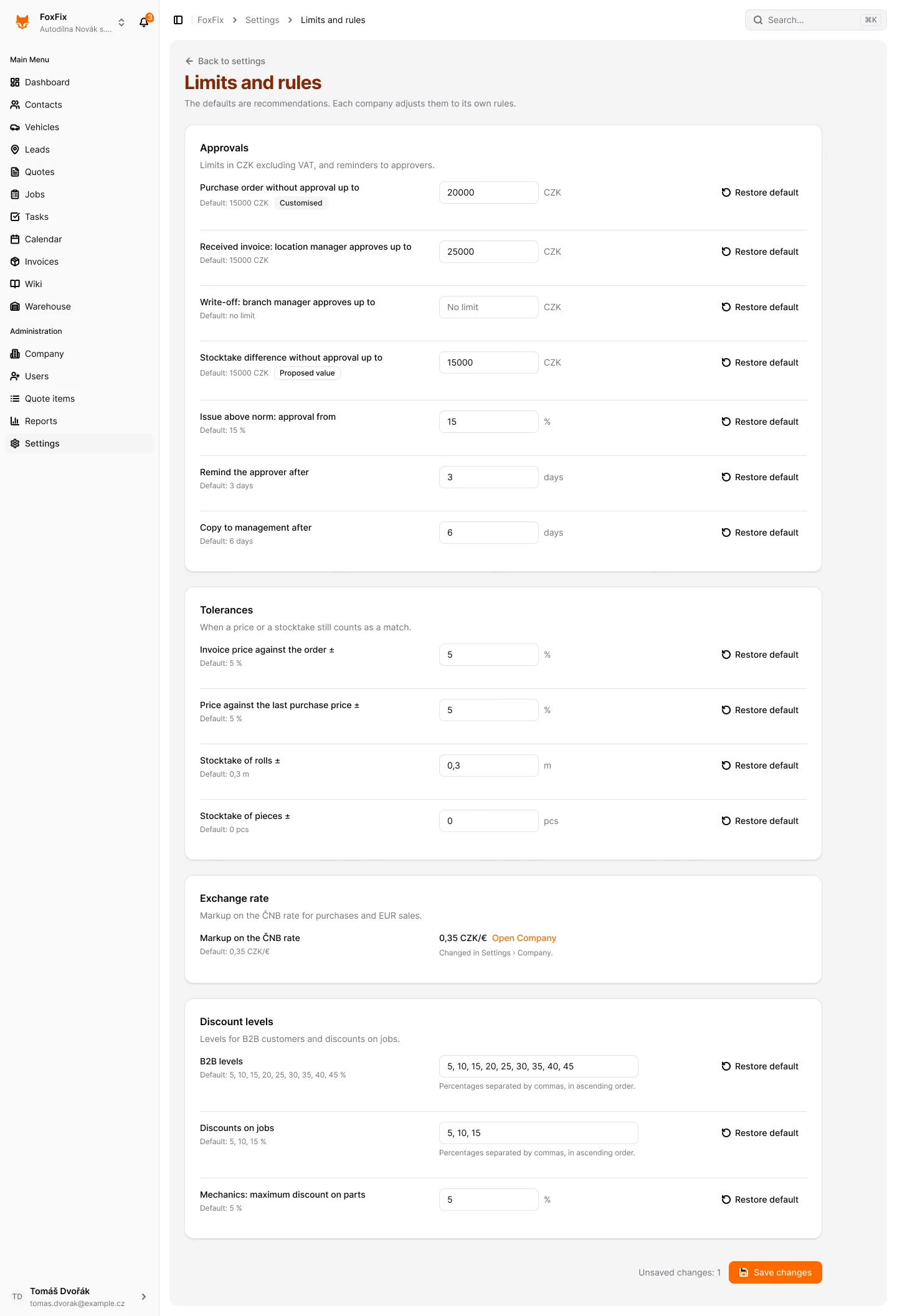 (opens the full-size image in a new tab)
How to change a value
- Find the row in its group (Approvals, Tolerances …). Below the row name you see Default: … – the value FoxFix supplies.
- Overwrite the value in the field.
- Click Save changes at the bottom. Next to the button you see how many changes are not saved yet.
What you see on the page:
- Customised – your company uses its own value instead of the default.
- Proposed value – the default is only a proposal so far. Check that it suits your company.
- Restore default – puts the FoxFix value back into the field. It applies only after Save changes.
- No limit – an empty write-off field means no limit applies.
FoxFix does not save a wrong value: the field turns red and Invalid value appears. For deadlines that follow each other, the first one must be shorter than the second – for example the reminder to the approver before the copy to management. Otherwise you see Must be less than “…”.
FoxFix starts using these values step by step as parts of the November 2026 update are switched on. Already today they drive, for example, document approvals, the invoice price tolerance against the order, the hour fund and cost rate of employees, the number series of documents numbered by FoxFix and the outgoing message limits.
Approvals
Limits are in CZK excluding VAT. How FoxFix chooses the approver from them is described on the For approval page.
| Setting | Default | What it means |
|---|---|---|
| Purchase order without approval up to | CZK 15,000 | A purchase order up to this amount needs no approval. |
| Received invoice: location manager approves up to | CZK 15,000 | Up to this amount the location manager approves a received invoice; above it the branch manager or the CFO. |
| Write-off: branch manager approves up to | no limit | Up to what amount the branch manager approves a write-off. |
| Stocktake difference without approval up to | CZK 15,000 | A stocktake difference up to this amount needs no approval. Proposed value. |
| Issue above norm: approval from | 15 % | From how many percent above the norm a material issue needs approval. |
| Remind the approver after | 3 days | When the approver gets a reminder of a pending request. |
| Copy to management after | 6 days | When management one level up gets a copy of a pending request. |
Tolerances
When a price or a stocktake still counts as a match.
| Setting | Default |
|---|---|
| Invoice price against the order ± | 5 % |
| Price against the last purchase price ± | 5 % |
| Stocktake of rolls ± | 0.3 m |
| Stocktake of pieces ± | 0 pcs (must match exactly) |
Exchange rate
The Markup on the ČNB rate (default CZK 0.35/€) applies to purchases and sales in euros. This page only shows it – you change it in Settings → Company, which the Open Company link leads to.
Discount levels
| Setting | Default |
|---|---|
| B2B levels | 5, 10, 15, 20, 25, 30, 35, 40, 45 % |
| Discounts on jobs | 5, 10, 15 % |
| Mechanics: maximum discount on parts | 5 % |
| Maximum discount on parts applies in locations | MECHANIKA (proposed value) |
Enter the levels as percentages separated by commas, from the smallest to the largest, at most 20 values.
In Maximum discount on parts applies in locations, enter location codes as shown in Settings → Locations, separated by commas. An empty field means the cap on parts applies nowhere.
Commission and bonuses
| Setting | Default |
|---|---|
| Commission on profit | 5 % |
| Bonus for the personal target | 1 % |
| Bonus for the personal and company target | 2 % |
| Estimated profit from sales before Inventory went live | 30 % |
Overdue customers, warranty
| Setting | Default |
|---|---|
| Block new orders after the due date | 15 days |
| B2B warranty | 12 months |
| B2C warranty | 24 months |
| Alert before the warranty ends | 30 days |
Deadlines
When items are highlighted, reminded and escalated. The row name says what the deadline watches.
| Setting | Default |
|---|---|
| Draft is highlighted from | 20th day |
| Draft is archived after | 30 days |
| Lead without a response is lost after | 30 days |
| Remind about a B2B lead after | 3 days |
| Goods in visible before the delivery date | 1 day |
| Goods in shown in red after | 30 days |
| Unfinished goods in goes to the manager after | 3 days |
| Supplier reminder escalates after | 5 days |
| Supplier warranty claim escalates after | 10 days |
| Uncollected order: remind after | 7 days |
| Uncollected order: escalate after | 14 days |
| Unreturned material after | 2 days |
| Goods issue without QR awaits confirmation for | 24 h |
| Stocktake is closed within | 7 days |
| Customer warranty claim deadline | 30 days |
| Alert before the warranty claim deadline | 5 days |
Pairs that follow each other: highlighting a draft must come before archiving it, the reminder about an uncollected order before the escalation, and the alert before the warranty claim deadline must be shorter than the deadline itself.
Employees
| Setting | Default | What it means |
|---|---|---|
| Employer contributions | 33.8% | Added to the gross wage of contract employees when the cost rate is calculated. The wage record keeps the percentage valid on the day it was entered. |
| Holiday calendar | Czechia | Public holidays that do not count towards the working-time fund. |
| Closed (additional days) | none | Other days when the company is closed. Enter dates as YYYY-MM-DD separated by commas. They do not count towards the working-time fund. |
How the hour fund and the rate are calculated is described on the Employees page.
Capacity, time tracking and norms
| Setting | Default |
|---|---|
| Day is nearly full from | 80 % |
| Break without asking up to | 0 min (0 = always ask) |
| Suggest a norm change from this number of cases | 5 cases |
| Suggest a norm change at a deviation above | 15 % |
Reports
When and to whom the weekly overview is sent by email.
- Weekly overview is sent on – the weekday, Monday by default.
- Sending time – 07:00 by default.
- Report recipients – tick the users who receive the overview. Nobody by default.
Number series
The format of document numbers that FoxFix numbers. Below the field you see an example number in the new format.
| Document | Default format | Example |
|---|---|---|
| Goods issue | VYD-{NNNN} | VYD-0001 |
| Stocktake | INV-{RRRR}-{NNN} | INV-2026-001 |
| Transfer note | PRE-{NNNN} | PRE-0001 |
| B2B quote | NB-{RRRR}-{NNN} | NB-2026-001 |
| Customer order | OO-{RRRR}-{NNN} | OO-2026-001 |
| Customer warranty claim | RK-{RRRR}-{NNN} | RK-2026-001 |
| Supplier warranty claim | RKD-{RRRR}-{NNN} | RKD-2026-001 |
| Delivery note | DL-{NNNN} | DL-0001 |
| Label | Q-{NNNNN} | Q-00001 |
The formats for goods issue, stocktake, transfer note, supplier warranty claim and delivery note are proposed values.
Placeholders in the format (the letters come from Czech: R = year, M = month, N = number):
| Placeholder | What it inserts |
|---|---|
| {RRRR} | year of the document, 4 digits |
| {RR} | year of the document, 2 digits |
| {MM} | month of the document, 2 digits |
| {NNN} | sequence number padded with zeros; the number of N is the number of digits (1–9) |
- The sequence number {N…} must appear exactly once.
- With {MM} the series starts again from 1 every month, with a year every year; without them it keeps counting.
- Outside the placeholders you may use letters without accents, digits and
the characters
-/._, at most 40 characters in total. - Numbers already issued are never renumbered – a new format only applies to later documents. A discarded document uses up its number, but two documents never get the same number.
Outgoing messages
How many recipients and attachments one message about a document may have, how long its text may be and how many messages one user sends per hour. All defaults are proposed values.
| Setting | Default | Allowed range |
|---|---|---|
| Maximum recipients per message | 10 | 1–20 |
| Maximum messages per user per hour | 30 | 1–100 |
| Maximum characters in the subject | 250 | 20–998 |
| Maximum characters in the message text | 20,000 | 500–100,000 |
| Maximum attachments per message | 5 | 1–10 |
| Maximum total attachment size | 10 MB | 1–25 MB |
What happens when a message exceeds a limit is described in Message preview before sending.