
For approval
The For approval page lists the documents you are to decide on: received invoices and supplier orders. You approve each one, or return it with a reason to whoever asked for approval. Open the page from the Waiting for you block on the dashboard or from a notification in the bell.
Who can see it
Approvals are part of the 5 Nov 2026 update and work only in companies where it is switched on. The queue is visible to everyone whose roles approve something (location head, branch head, CFO, managing director, administrator), and to whoever is currently covering for one of them.
A single request is visible only to the people it concerns: the approver and whoever covers for them, the person who created the document and the person who asked for approval, whoever decided it, and management allowed to approve in that area – a location head for their location, a branch head for their branch, the CFO and the managing director across the company. Other colleagues do not see other people's requests, amounts or reasons for return. Only the approver and their substitute get the Approve and Return buttons; everyone else who sees the request (management, the document's author) sees it read-only.
 (opens the full-size image in a new tab)
Who approves what
The app decides who approves a document from its amount excluding VAT, its location and its branch. The limits are company settings in Settings › Limits and rules; the default is CZK 15,000 and it is inclusive (a document for exactly CZK 15,000 is within the limit).
| Document | Within the limit | Over the limit |
|---|---|---|
| Supplier order | no approval | location head; without a location the branch head |
| Received invoice | location head; without a location the branch head | the branch head if the document belongs to their branch; otherwise the CFO |
- Foreign currency. An amount in euros is converted at the ČNB rate of the document date (the order date for an order, the date of taxable supply for an invoice), and the rate is stored with the request. A later change of the rate does not change the decision.
- The document's branch is the branch on the document, otherwise the branch of its location, otherwise the branch of the person who created it.
- Four eyes. You never approve your own document – nor one you asked to have approved. Such a document goes one level up: from the location head to the branch head, then to the CFO, the managing director and the administrator. A document also goes one level up when its level has nobody.
- Document author. The app records who really created the document from the signed-in user when it is created – it cannot be chosen or changed later. Four eyes are based on it. When the document lists a different author than the person who created it, neither of them can approve it, and Why you says so.
- Unverified author. For documents created before author verification (or when the author record is missing) the app cannot verify the author. Such a document cannot be sent for approval – the app refuses the request and asks you to contact your company administrator. The same applies to a document whose author is no longer in your company.
The queue
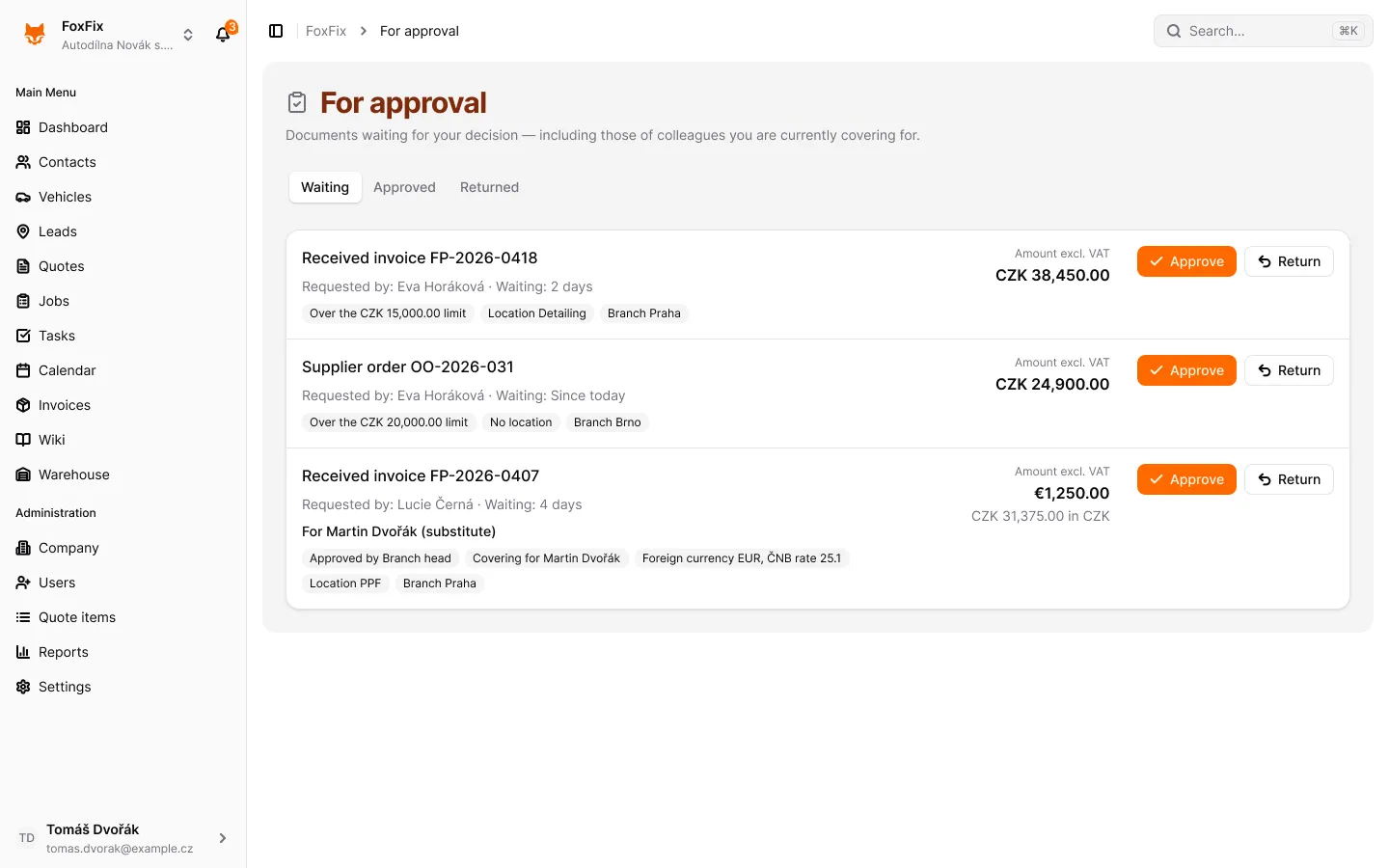
The Waiting, Approved and Returned tabs switch between documents waiting for your decision and those already decided. For each document you see:
- the document type and number – click to open it,
- who asked for approval and how long the request has been waiting,
- the amount excluding VAT, and the CZK equivalent for a foreign currency,
- Why you – the reasons the document came to you: over or within the limit, location and branch, foreign currency and rate, own document moved one level up, substitution.
The oldest requests are at the top. When you arrive from a notification, the app highlights that request in the queue.
Approve and return
- Approve – the document is approved; who and when is written to the request history.
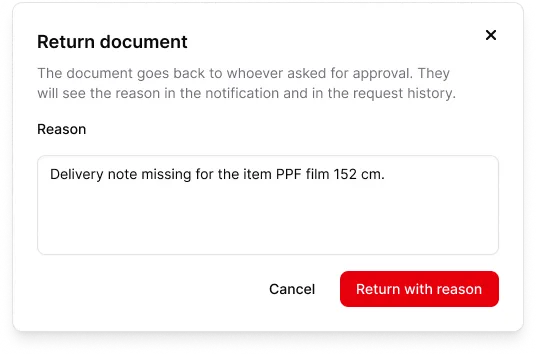
- Return – opens a window with a required reason (e.g. delivery note missing). The requester receives a notification with the reason. They can send the corrected document for approval again – a new request is created.
The server always decides: if someone else has already decided the request, or it is not yours, the app says so and changes nothing.
- Change after approval. If the document's amount changes after it was approved, it goes for approval again as a new request; Why you shows the amount that was approved before. Without an amount change the document stays approved.
- A cancelled document cannot be sent for approval.
 (opens the full-size image in a new tab)
When an approver leaves
When an approver is no longer active or loses the right to approve, a pending request does not get stuck with them. The next time it is sent for approval, or at the daily check, the app passes it to the next approver – first a colleague at the same level (e.g. the other head of the same branch), otherwise one level up. The new approver receives a notification and sees in Why you whom they took the request over from. When nobody is left who could approve, the app tells the requester – add cost-centre and branch heads or the CFO and managing-director roles.
Substitution
When you cover for someone (Settings › Users, substitute from–to), their queue also shows for you during the substitution, marked "For … (substitute)". You may decide only within the scope of the substitution and never on your own document. When the substitution ends, open documents stay with the original approver.
Reminders and copy to management
An open request reminds by itself: after 3 days the approver (and their substitute) gets a reminder, after 6 days management one level up gets a copy. Each comes once, in the bell and, depending on settings, by e-mail. The company changes the number of days in Settings › Limits and rules.