
Customer terms
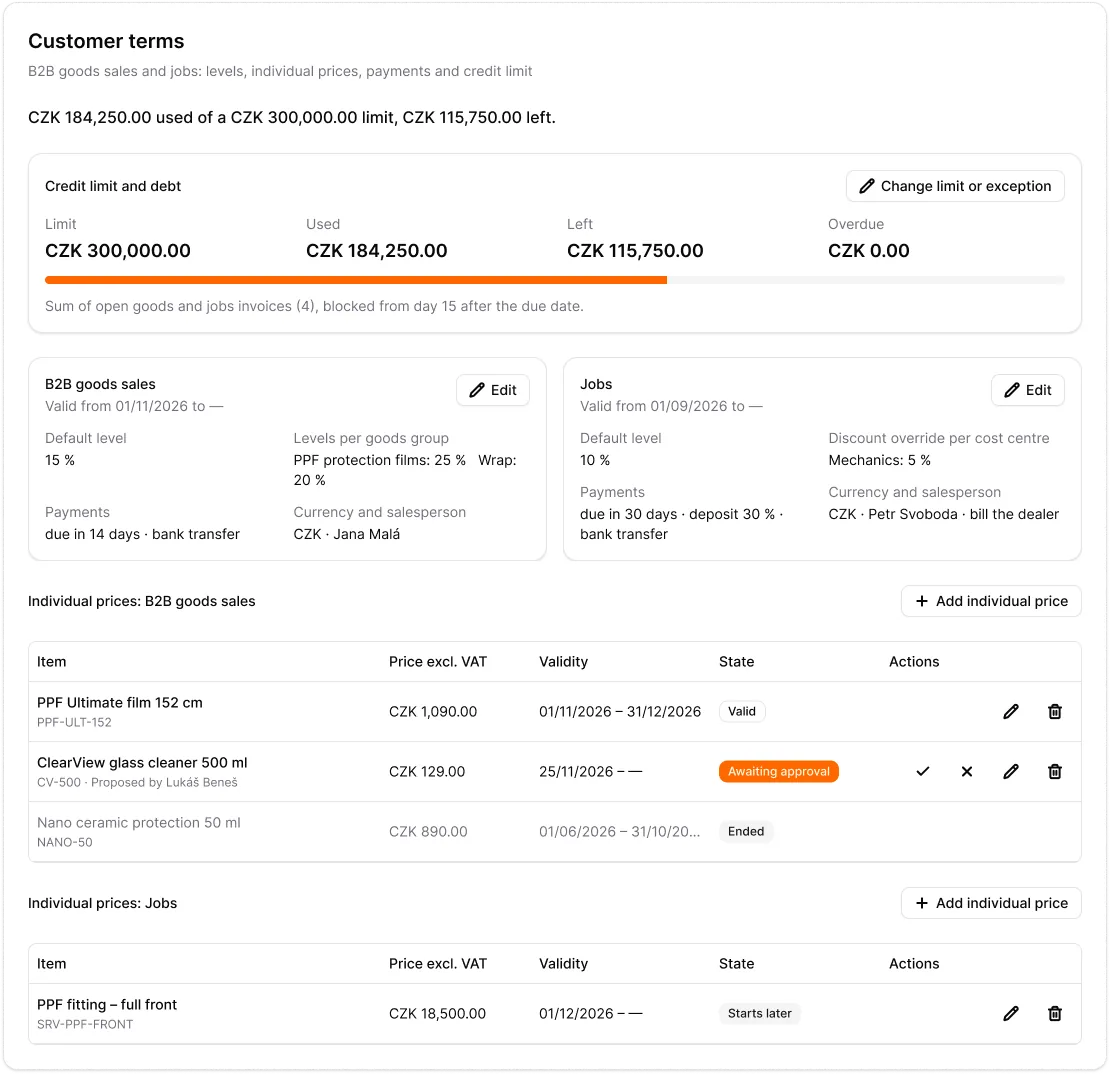
One company (company ID) is one contact in FoxFix. The company detail has a Customer terms section where you see whether the company buys goods from you, has cars done, or both – and on what terms.
 (opens the full-size image in a new tab)
Who can see it
- CFO, Managing director, Admin and Branch manager – change relationships, levels, payments and individual prices and approve proposals.
- CFO, Managing director and Admin – also change the credit limit and grant block exceptions.
- Service salesperson – reads and proposes only the Jobs terms; B2B salesperson only B2B goods sales. A proposed individual price waits for approval.
- Technician – reads only the Jobs terms; Back office reads both relationships.
- Other roles – do not see the Customer terms section.
The section is part of the November 2026 update and appears once your company has it switched on.
What you will find on the page
- The headline sentence – the one finding you need to know at once: that the customer is blocked and why, that an exception lifts the block, how much of the limit is used, or that there is no limit.
- Credit limit and debt – limit, used, left, overdue, a usage bar and the block exception.
- B2B goods sales and Jobs – two relationships, each with its own validity, levels and payments.
- Individual prices – separately for each relationship that is set up.
Credit limit and blocking
The limit covers the whole company: the amount used is the sum of open goods and jobs invoices (incl. VAT, in the company currency). An invoice is overdue from the day after its due date; the customer is blocked from day 15 after the due date (default setting in Limits and rules). The block lifts by itself once the invoice is paid.
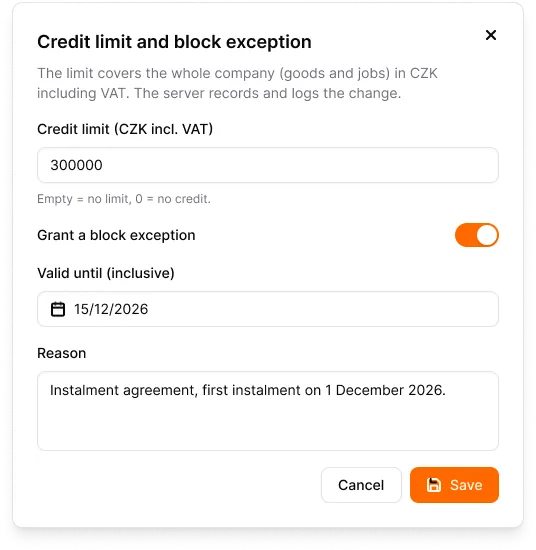
Change the limit with Change limit or exception:
- Enter the Credit limit. Empty = no limit, 0 = no credit.
- For an exception switch on Grant a block exception and fill in Valid until and Reason.
- Click Save.
 (opens the full-size image in a new tab)
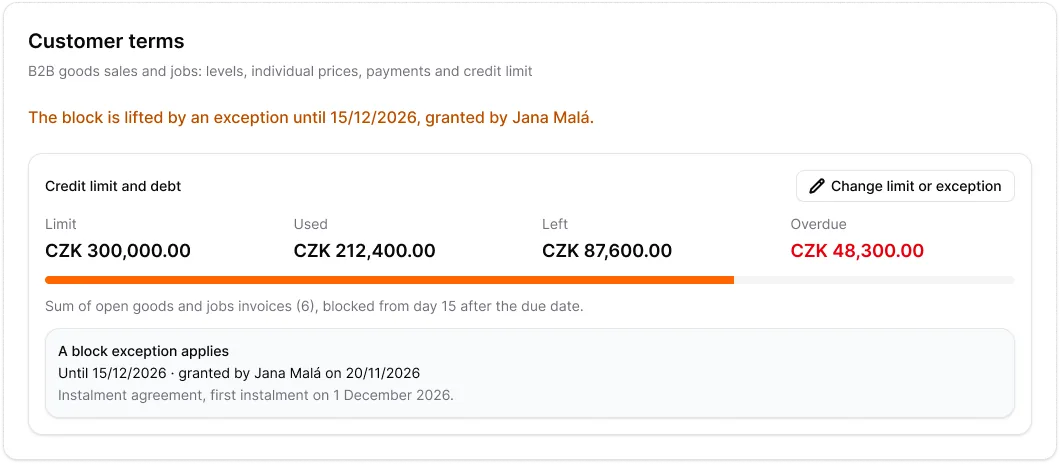
FoxFix fills in who granted the exception and when, and shows it with the exception.
 (opens the full-size image in a new tab)
The limit cannot be verified
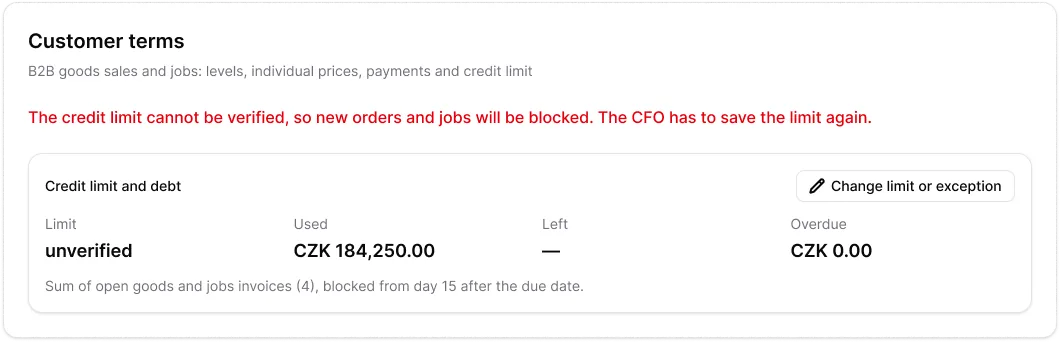
When the headline says "The credit limit cannot be verified", the stored limit does not match the verified copy on the server. FoxFix then treats the customer as blocked, never as "no limit". The same happens when someone deletes a contact with a limit and creates it again – FoxFix remembers that the limit existed. The CFO enters the limit again and saves – that verifies it again.
 (opens the full-size image in a new tab)
B2B goods sales
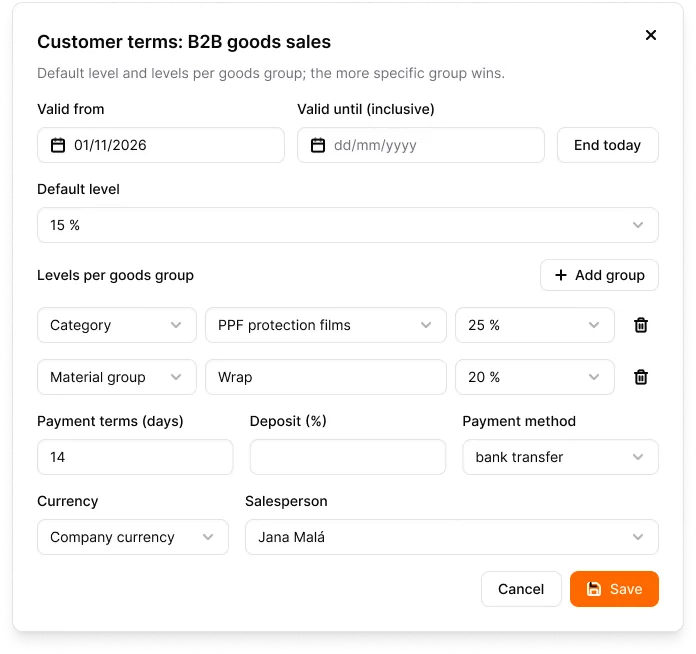
With Set up (or Edit) on B2B goods sales you enter:
- Valid from and Valid until – End today ends the relationship today; the history stays;
- Default level – optional; without it groups without a level get no discount;
- Levels per goods group – a stock category or a material group and its level, or 0 % (no discount);
- Payment terms, Deposit, Payment method, Currency and Salesperson.
 (opens the full-size image in a new tab)
Jobs
For Jobs you choose the partner's discount level (for example 15 %) and, in Discount override per cost centre, another discount for a specific cost centre – typically parts in Mechanics. Further Bill to (the dealer or the end customer) and Assigned B2B price list sheet. Without a level the contact is an end customer without a discount.
Individual prices
An individual price applies to one goods card (B2B sales) or one service price list item (jobs), valid from–to, and beats the level.
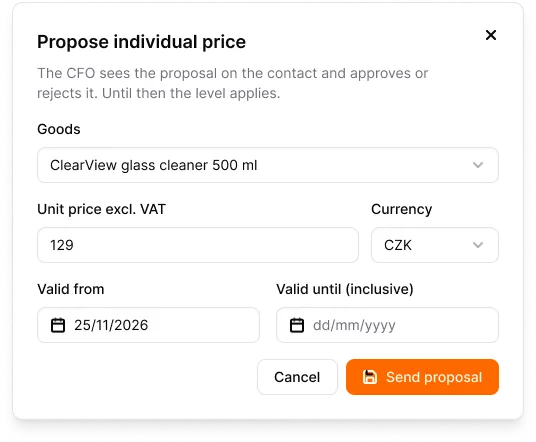
- Click Add individual price (a salesperson sees Propose individual price).
- Search for the item, enter the Unit price excl. VAT, currency and validity.
- Click Save (a salesperson Send proposal).
 (opens the full-size image in a new tab)
After saving, FoxFix warns when the price is below the card's maximum-discount price. The below cost warning for goods or services goes only to users who may see purchase prices or who change the terms. It does not show the cost itself.
A salesperson's proposal has the state Awaiting approval. The CFO approves (tick) or rejects (cross) it on the contact; you cannot approve your own proposal. Until then the level applies.
Remove (bin) does not delete the price: a proposal is rejected, a running price ends yesterday and a price that has not started yet is rejected. Everything stays in the list and in the contact history.
History
Every change to the terms, limit, exception and individual prices is written to the Contact history (who, when, what) at the bottom of the detail.