
Serial numbers and warranty on the stock card
FoxFix tracks a serial number (S/N) for every stock card. When you receive a card for the first time, the warehouse worker decides whether the item has a serial number:
- Has a serial number – the S/N of every item is scanned at this and every later receipt,
- No serial number — don't ask again – the card is kept without serial numbers and receiving no longer asks for them.
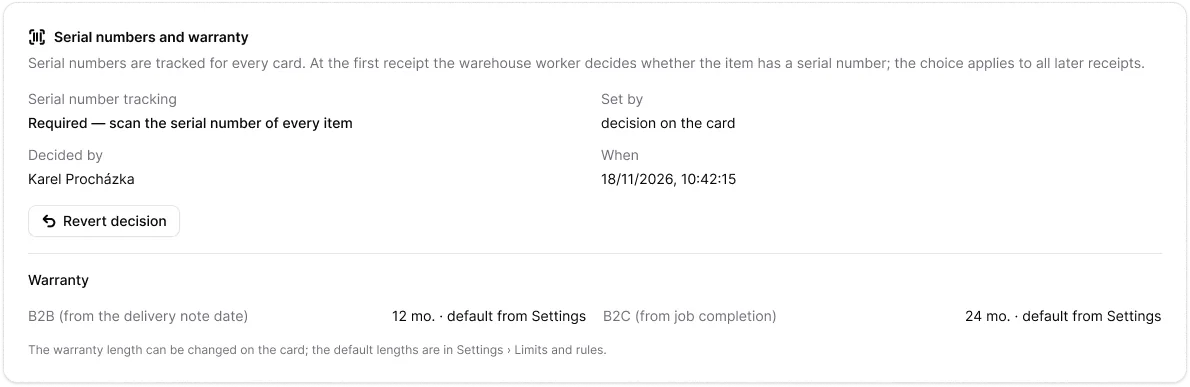
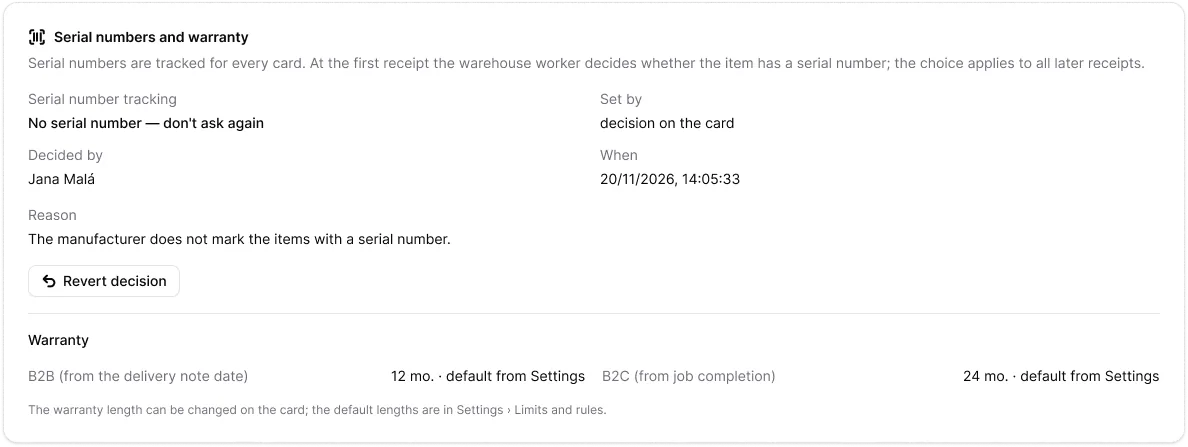
The choice is saved on the card together with who made it and when, and it applies to all later receipts. Only a manager may change it, always with a reason.
You find the Serial numbers and warranty block on the stock card (variant) detail in Warehouse → Catalogue. It is part of the November 2026 update and appears once your company has it switched on.
 (opens the full-size image in a new tab)
Who can see it
- The block is read by roles that have the right to read in the “Serial numbers and warranty” row of Settings → Roles and permissions for the whole company or a branch (Warehouse clerk, Purchasing, Back office, Branch manager, CFO, Managing director, Admin).
- Roles with the right to edit may switch tracking on with Has a serial number: Warehouse clerk, Back office, Branch manager, CFO, Managing director and Admin.
- Only roles with the right to approve may Revert decision: Branch manager, CFO, Managing director and Admin.
What the block shows
| Field | Meaning |
|---|---|
| Serial number tracking | The effective mode of the card (see the table below). |
| Set by | Why the card has this mode: assortment group, tracked by rolls, decision on the card, or default — track everything. |
| Decided by and When | Who decided about the card's S/N and when (at the first receipt or a manager). |
| Reason | The reason the manager entered when reverting the decision. |
| Warranty | The warranty length for B2B and B2C and where it comes from (from the card, from the assortment group, default from Settings). |
Tracking modes:
| Mode | What receiving does |
|---|---|
| Track — ask at the first receipt | The default of every card. The warehouse worker decides at the first receipt. |
| Required — scan the serial number of every item | Receiving asks for the serial number of every item. |
| No serial number — don't ask again | The card is kept without serial numbers. |
| Manufacturer's roll number | Cards tracked by rolls (films) – the manufacturer's roll number is entered instead of a S/N. |
Decision at the first receipt
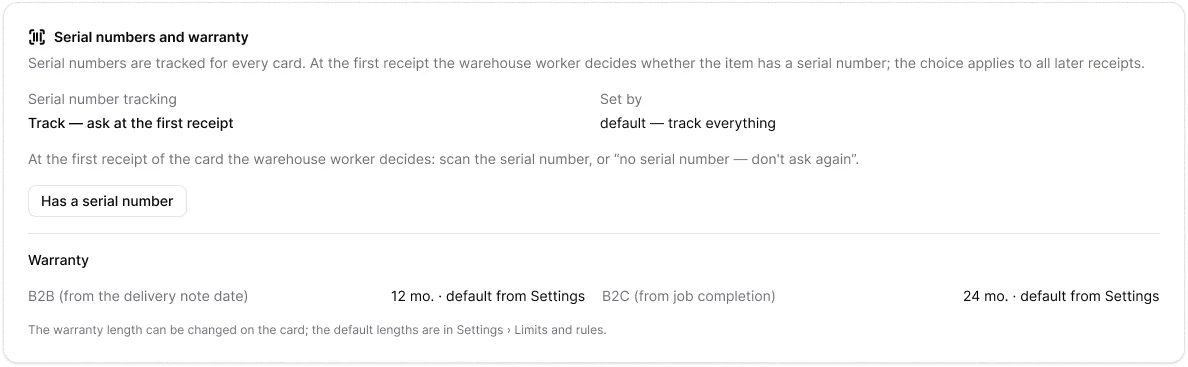
Until someone decides about the card, it has the mode Track — ask at the first receipt and the block shows the Has a serial number button. It switches serial number tracking on for this and every later receipt, even before the first receipt.
 (opens the full-size image in a new tab)
- You will not find No serial number — don't ask again on the card – it belongs to the card's first receipt. The receiving screen that offers it comes with a later part of the update. Until then the card stays in the default “track” mode.
- The new receiving also brings the automatic switch to Required when a serial number is scanned at the first receipt. Today's goods receipt does not capture serial numbers yet.
- A decided card no longer asks. Sending the same choice again changes nothing; FoxFix refuses the opposite choice – only a manager may change it.
- Every decision is written to the card's Change history.
When S/N cannot be switched off
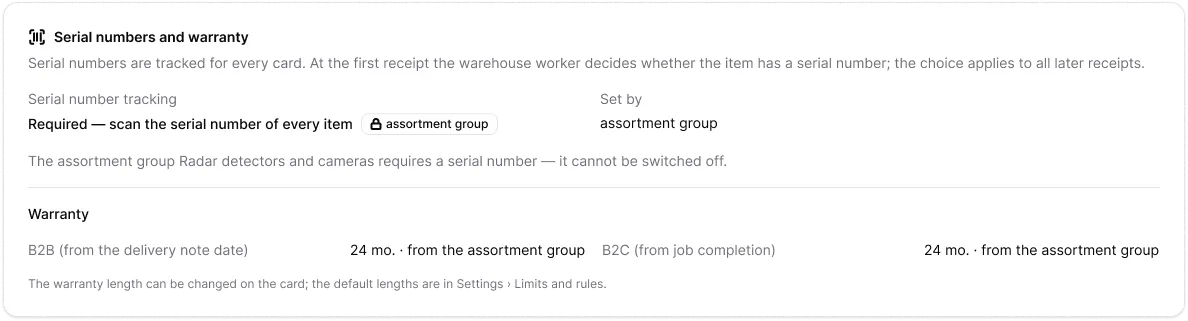
For assortment groups that require a serial number – typically radar detectors, cameras and jammers because of the warranty – tracking is locked. The block shows a lock badge and the group name, the decision cannot be reverted and receiving will not offer No serial number. The lock applies even if the card got a “no serial number” decision earlier.
 (opens the full-size image in a new tab)
A group locks S/N when it has the S/N mode Required in Manage assortment, or serial number among its required fields.
Revert a decision
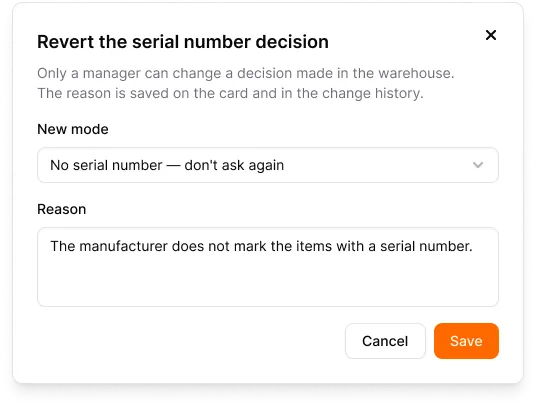
- On the card, click Revert decision in the Serial numbers and warranty block.
- Choose the New mode:
- Track — ask at the first receipt – the next receipt asks again,
- Required – the S/N of every item is scanned from the next receipt,
- No serial number – only for groups that do not lock S/N.
- Fill in the Reason (required) and click Save.
 (opens the full-size image in a new tab)
The reason, who and when are saved on the card and in the change history. The change applies from the next receipt; items already in stock do not change.
 (opens the full-size image in a new tab)
One serial number = one item
A serial number is unique within the company. FoxFix compares it regardless of letter case and spaces (ab 12-c = AB12-C); a dash, however, stays part of the number (SN-001 and SN001 are two items).
- When another item in the company already has the S/N, receiving refuses it and shows when that item was received.
- When the S/N belongs to different goods, FoxFix reports that it does not belong on this document.
- Items of a card with the No serial number or Manufacturer's roll number mode get no serial number.
Warranty
The default warranty lengths are B2B 12 months and B2C 24 months. The company changes them in Settings → Limits and rules, an assortment group can override them for its cards and a card for itself.
- The B2B warranty runs from the delivery note date (shipping),
- the B2C warranty runs from job completion (installation).
The end of the warranty is counted as a statutory period in months: it ends on the day with the same number, and when the month has no such day, on the last day of the month (a 1-month warranty from 31 January ends on 28 February). The warranty is still valid on its last day. Items whose warranty ends within 30 days (the number of days is in Settings) are marked ending within 30 days.
What comes in the next steps of the update
Receiving by scanning the S/N from the box, the list of items with S/N (Stock → Serial numbers), scanning S/N on mobile, issuing and shipping with S/N and recording the warranty on the item come with further parts of the update.